Live across 10+ dealerships

Every unit traceable. Every box scanned.

StockGenie Pro runs the whole of a parts business — inward receiving and QR labelling, picking and box-wise dispatch, the retail counter, workshop job cards, returns and credit notes — on one platform, with two-way Zoho Books sync and a label on every single unit.

17 screens across warehouse, counter & workshop
10+ roles with per-module access
Zoho Books two-way sync
DMS PDF & Excel imports supported
Android & iPhone apps · customer portal

Scan to open on your phone

The platform

One system, from the truck to the counter

Every module below is live in production today. Buy the whole platform or start with one and add the rest as you grow.

Inward & Put-Away

Receive the truck, validate against the bill, and mint a QR label for every unit at the point of receipt.

  • One-click HMCL fetch — packing slip, sales statement and account statement straight from the Hero dealer portal, no download or upload
  • Single-part boxes received with one QR scan; mixed boxes validated part by part, never counted twice
  • GRN validation against the supplier bill, with over- and under-receipt caught at the door
  • Label mint at receipt — one QR per unit, MOQ-aware splitting for multi-packs
  • Location-confirmed put-away that survives a reload, with pending quantities rebuilt from the ledger
  • Partial close — book what arrived, keep the balance open, reopen the same PO when the rest lands
  • Excess reconciliation — trim, scan-to-keep, or push to the MOQ bucket

Labels & Traceability

A single standard label format, so any unit can be traced back to the bill it arrived on.

  • PREFIX · PartNo · Unique12 · Qty · MRP · BillNo · Date on every label
  • Damaged-label replacement and controlled reprints with an audit record
  • MRP correction by scan — fix only the wrong physical labels when old and new coexist
  • Part Stock Report — the complete life history of a part on one page
  • Sheet layouts for 35×22mm, 50mm and QR-only stock

Sales Orders & Picking

From the customer's PDF to an assigned picklist, without anyone retyping a part number.

  • Order from a customer PDF, parsed line by line
  • Auto A/B/C variant swap when the ordered variant is out but a sibling is in stock
  • Picker assignment gate — no picklist opens until the order is assigned to someone
  • Back orders raised straight into the pick queue
  • Multiple invoices per order for split-invoice workflows

Outward & Box Packing

Box-wise scanning with the guards that stop the errors dispatch actually makes.

  • Duplicate, MRP-mismatch and MOQ-excess guards at the moment of scan
  • Box numbers captured on every scan, carried through to the packing slip
  • Manual entry edit and box transfer, with an admin-only cleanup log
  • Packing slip & snapshot with live box counts and CSV export
  • Works with hardware scanners, phone cameras, or typed entry

Retail Counter

Sell over the counter at branch level, with stock and Zoho kept straight automatically.

  • Scan a label to sell that exact piece, or type a part and quantity to take it oldest-first
  • Walk-in or named customer, with the customer's discount picked up automatically
  • Split payment across cash, card, UPI and credit with a live balance
  • Branch-wise bill numbering — RET-MDU-2627-00042 — minted transactionally, so two tills can never clash
  • Zoho push happens in the background, so a slow or offline Zoho never stops you billing

Job Cards & Service

Open a card against a vehicle, issue parts as they are used, invoice when the work is done.

  • Vehicle, odometer, technician and complaint captured on the card
  • Stock leaves at issue, not at invoice — so a card open for days never shows parts you no longer have
  • Unused parts return to branch stock, and only the net quantity is billed
  • Labour and other charges as service items, flagged in red before close if unmapped
  • Mechanic tagging with parts discount — several internal, or exactly one external workshop

Branch Cash Book

One till per branch per day, where the day's takings cannot quietly drift.

  • Cash sales post themselves the moment a sale completes — and only the cash portion
  • Opening carries forward from yesterday's counted close, so the chain cannot silently break
  • Close with a live variance preview as you type the counted cash
  • Nothing is ever deleted — a mistake is corrected with a signed adjustment and a reason
  • Expenses by category, bank deposits, and admin reopen with the previous close kept on record

Returns & Credit Notes

Goods come back through the same machinery they went out through.

  • Find by bill, invoice, job card — or just scan a label from the box
  • Retail returns label by label; a label already returned cannot be returned twice
  • Service returns by quantity, capped at issued minus returned minus credited
  • Cash refund or credit note only, with refunds shown separately so the day's real takings stay visible
  • Zoho credit note raised and applied to the original invoice, safely retryable

Claims & Reconciliation

The money side of a parts business, where most of it usually leaks.

  • MOQ pending bucket with one-click cross-invoice linking
  • Short-supply and MRP-mismatch credit notes tracked as separate queues
  • DMS invoice match — upload the SAP PDF, match line by line against packed quantities, catch variance
  • Dealer billing — bill the balance of an order from your own dealership DMS without touching warehouse stock
  • Complaint tracker keyed to the customer across every code they trade under

Dispatch & Delivery

From the packed box to a signature at the shop.

  • Dispatch board with transport assignment, planned trips (vehicle first, invoices later) and trip sheets
  • Box scan before the truck leaves — blocked until every box is loaded, manager override with reason
  • Paid / To Pay and transporter LR; LR pending reminders when the LR comes next day
  • Dedicated driver login — a driver sees only their own trips
  • Box-level delivery confirmation with photo proof; short or damaged boxes raise a complaint automatically
  • Dispatch Register with town, vehicle, transporter and LR, exportable
  • Delayed-delivery alerts to the logistics manager
  • Date-range filters so last month's pending deliveries never disappear

Stock Intelligence

Not just what you have, but what you should be carrying.

  • ABC analysis — the fifth of parts driving four-fifths of your value
  • FSN by order frequency, and Movement Code MC1–MC6 by how many of the last six months a part sold in
  • Stockout root cause — complete stockouts vs partial fills, with the rupee loss attributed to each
  • Location stock — scan a bin label and see everything physically in it
  • Fill rate & lost sales, order-to-dispatch time, and picker / checker efficiency
  • Full-warehouse or location-scoped audits, DMS closing-stock compare, Excel export throughout

Field Sales App

An Android companion for the dealer sales executives who are out all day.

  • Check-in and check-out with GPS, and order taking at the counter straight into the warehouse queue
  • Beat plans — create routes and assign them to each DSE, with plan vs actual visits
  • GPS-stamped shop visits with outcome capture
  • Customers scoped to the rep automatically by owner mapping
  • Daily map and report to the sales manager over Telegram
  • Mechanic and notes-only visits counted as real stops
  • Expense and cash ledger with manager edit and audit trail

Box IDs & Cover Labels

Every carton carries its own ID, scanned at packing, loading and delivery.

  • Unique Box ID series per company — last and next ID shown, unused labels listed as ranges
  • A4 24-up sticker sheets or 3-up label rolls, with a safe margin so nothing is cut at the edge
  • Cover label per customer — name in Tamil, Telugu, Kannada, Malayalam or Hindi, town, address
  • Total boxes, Box ID ranges and Paid / To Pay on the cover; one combined cover per customer
  • 6×4 label printer or A4 8-up sheet, starting at any position on a part-used sheet

Shared Fleet for Group Companies

Sister companies in one group share vehicles, drivers and the route — one truck, one trip.

  • Common trip board across all group companies
  • Pickup route in a fixed order; each company loads and scans its own invoices
  • "Truck left" per pickup, delivery stop order set by the planner
  • Driver delivers stop by stop for every company, with box scan and photo proof
  • Fleet report with trip cost split between companies by boxes

Gate Security & Fuel

What enters and leaves the premises, and what every vehicle costs to run.

  • Vehicle in / out register with time, vehicle number and purpose
  • Visitor register on a simple security-role screen
  • Fuel tokens issued per vehicle and driver, with odometer reading
  • Mileage tracking (km per litre) and fuel reports by vehicle, driver and period

Multi-Branch & Transfers

Several godowns or branches, one stock picture.

  • Branch-wise stock and branch-bound users
  • Transfer orders — pick, dispatch, in-transit, receive into bin at the other end
  • A/B/C variant auto-swap when the asked variant is out of stock
  • Stock audits by location against the DMS closing stock
How it works

A part's life, start to finish

Every step writes to the same ledger, so stock, cash and Zoho never have to be reconciled by hand.

01OF 08
Receive
Truck in, bill validated, a QR label minted for every unit.
Tap a checkpoint, use ◀ ▶ — or grab the car and drive it.
Integrations & platform

Fits the tools you already run on

Zoho Books & Inventory

Two-way, and built so Zoho being slow is never your problem.

  • In: invoices, contacts, items, credit notes and purchase orders
  • Out: completed dispatches with box counts, counter and service invoices, credit notes applied to their original invoice
  • One-click OAuth connect — no copying refresh tokens inside a sixty-second window
  • Tax-inclusive MRP handled correctly, so the Zoho total matches the printed bill exactly
  • Safe retries by construction — a document number is fixed when created, so a retry links rather than duplicates

Dealer DMS & SAP

For dealers billing through a manufacturer's system.

  • SAP invoice PDF parsing with line-by-line quantity and value extraction
  • Credit note PDF import that flips label status and adds stock back
  • Closing-stock compare against your own counted figures
  • Handles alphanumeric branch invoice numbers and multi-line part descriptions

Access & Isolation

Built for a business with branches, not a single shared login.

  • 10+ roles — admin, manager, picker, packer, driver, billing office, field rep and more
  • Per-module gating, so you only see what you've bought and what your job needs
  • A separate database per dealer — your data is not in a shared table with anyone else's
  • Branch binding — a billing-office user is bound to one branch at write time, never chosen from a dropdown
  • Six languages — English, Tamil, Telugu, Kannada, Malayalam and Hindi
  • Super-admin can operate across companies from one login

Works Where You Work

The warehouse floor and the back office need different things.

  • Light and dark themes across every screen, remembered per device
  • Hardware scanners, phone cameras or typed entry — all three, everywhere it matters
  • 48px tap targets on scanning screens, for gloved hands
  • StockGenie Pro & Field apps on Android and iPhone — see the apps
  • Runs in the browser — nothing to install on a warehouse PC
See it

What your team and your customers see

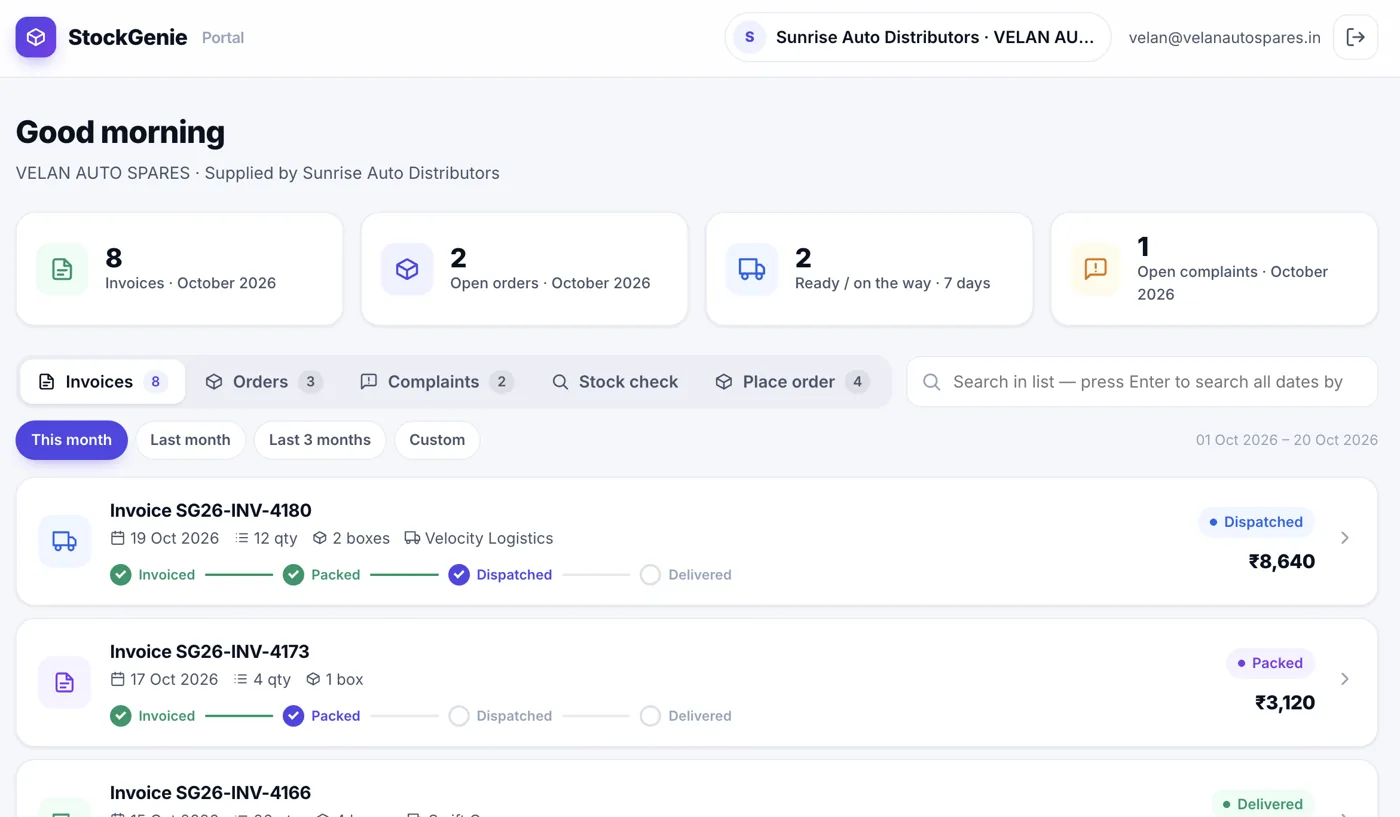
Real screens from StockGenie Pro, shown with sample data.

StockGenie customer portal dashboard

Mobile apps

On the warehouse floor, on the road, and in your customers' hands

Two apps on Android and iPhone, plus a customer portal your retailers can open from the app, a browser or your Zoho Books customer portal.

StockGenie Pro

For distributor staff and their customers
🏭 Staff
  • Scan-checked receiving, picking and packing
  • Identify any part, box or bin label with the camera
  • "My tasks" with alerts when work is assigned
  • Face ID / fingerprint lock for shared phones
🛒 Your customers
  • Check stock — available or not, never the quantity
  • Place orders straight into your picking queue
  • Invoices, box-wise packing slips, delivery status
  • Raise complaints & warranty claims, get notified

StockGenie Field

For travelling sales reps
  • GPS shop check-in (only while the app is open)
  • Orders from your live item list, each customer's discount and pack quantity applied
  • Works offline on rural routes — orders sync when signal returns
  • Complaints and visit notes; managers get a daily map report
  • Tamil, Telugu, Kannada, Malayalam and Hindi
👤

Customer Portal

Your retailers, served 24×7
  • Stock check & ordering — fewer "is this part in stock?" calls
  • Live invoices with packing slips and dispatch / delivery status
  • Complaints, warranty & cash-discount claims with progress you can see
  • Several logins per shop, and a view-only login for company officials
  • Zoho Books customer-portal tab with automatic sign-in
0
Screens in the platform
0
Dealerships live today
0
Modules, licensed separately
0
Typical payback period
Pricing

Built to save you more than it costs

Most clients recover the full cost within 30–45 days by reducing dispatch errors and inventory loss.

Most chosen

Full Platform Access

₹15,000 /month
or ₹75,000 for 6 months (save ₹15,000)
  • Every module included
  • Unlimited users and roles
  • Zoho Books integration
  • Mobile, scanner and desktop
  • Dedicated database for your dealership
  • Priority support
Book a demo

Most clients choose this for full operational control.

Modular Plan

₹5,000 /month
+ ₹2,500 per additional module
  • Start with a single module
  • Add modules at any time
  • Unlimited users
  • Same platform, same support
Talk to us

Good if you want to start with warehouse only and add the counter later.

What it typically saves, at ₹1.5L a year

Dispatch error reduction₹20K – ₹80K / month
Inventory accuracy₹20K – ₹1L / month
Operational efficiency₹15K – ₹40K / month
Annual cost ₹1,50,000 (two 6-month terms) · typical savings ₹3L – ₹12L a year · 2× to 8× return
Ranges from our existing clients' own figures. Yours will depend on volume and current error rates — we'll model it with you before you commit.
Questions

The things people ask first

How long does it take to go live?

A warehouse can be scanning within a day. We create your workspace, load your item master, print your first labels and train the floor team in a single session. Counter billing, job cards and Zoho sync are usually switched on over the following week, once your branches and item mappings are set up.

Do we have to use Zoho?

No. Zoho Books is optional and module-gated. Dealers billing through a manufacturer's DMS use the SAP invoice match instead, and some clients run the warehouse modules with no accounting integration at all. If you do use Zoho, items and contacts stay authored in Zoho and sync into StockGenie — we never create them behind your back.

Is our data separated from other dealers?

Yes, at the database level. Every dealership runs in its own dedicated database rather than sharing tables with other clients, so there is no scenario in which a query returns someone else's stock or invoices. Within your own workspace, access is further scoped by role, module and branch.

What hardware do we need?

A label printer and, ideally, a wired or Bluetooth barcode scanner. Everything else runs in a normal browser on the PCs you already have. Where a scanner isn't practical, every scanning screen also accepts a phone camera or typed entry, so a stocktake can be done from a phone.

What happens if the internet drops mid-dispatch?

Scans are written as they happen rather than batched at the end, so a dropped connection costs you the scans in flight, not the session. Operations that mint a number — bills, invoices, credit notes — fix that number before pushing to Zoho, so retrying after an outage links the existing document instead of creating a duplicate.

Can it connect to our other systems?

Yes. APIs are in place to connect StockGenie Pro with any ERP, DMS or accounting system. Zoho Books and Zoho Inventory are supported today for invoices, credit notes, transfer orders and stock, and Hero dealers can pull HMCL packing slips and statements straight from the dealer portal.

Can the floor team use it in their own language?

Yes. Every scanning screen switches between English, Tamil, Telugu, Kannada, Malayalam and Hindi, and the cover label can print the customer's name in the local script.

Can we start with one part of it?

Yes — that's what the modular plan is for. Most dealers start with inward, labelling and outward, because that is where the errors cost the most, then add the retail counter, job cards or analytics later. Modules are switched on per company, so nobody sees a screen you haven't bought.


See it running on your own parts

Send us a recent invoice and a stock list. We'll show you the same workflow with your data in it, rather than a generic demo.